
Using AI Assistants Effectively
Learn how to effectively use AI assistants, their features, and how to leverage the benefits of generative AI.
Before we dive deep into CamoCopy's functions, it's worth looking at why AI assistants are indispensable today. They are far more than simple text generators – they are versatile partners for complex digital tasks:
1. Content Creation and Text Work
- Text Generation: Whether emails, reports, or essays – the AI formulates flowing, well-structured texts from bullet points in seconds.
- Creative Content: Whether blog posts, product descriptions, or social media captions – the AI delivers variations and ideas at the push of a button.
- Editing: Have your texts corrected, rewritten, or adjusted in tone (e.g., more professional, friendlier).
2. Analysis and Document Management
- Mastering Long Documents: The AI can read and summarize extensive PDFs or reports in a very short time.
- Precise Search: Instead of combing through entire documents yourself, you can ask the AI to find specific information – like "What is the email address of the contact person on page 40?".
- Translation & Adaptation: Documents in foreign languages can not only be translated but directly summarized in your target language.
3. Visual Understanding (Image Analysis)
- Explain Diagrams: Upload complex charts or statistics. The AI analyzes the visual data and breaks it down comprehensively for you.
- Image-to-Text: The AI can recognize content in images, describe it, or convert handwritten notes into digital text.
4. Brainstorming and Problem Solving
- Complex Tasks: From planning a marketing strategy to debugging code – the AI helps develop logical steps.
- Change of Perspective: Let the AI act as a "critical thinker" to find counterarguments and sharpen your decisions.
The CamoCopy AI Assistant is your versatile tool for this digital everyday life. It works similarly to the known market leaders – ChatGPT, Gemini, Grok, or Claude – but offers a decisive advantage: Uncompromising Data Privacy.
At CamoCopy, we do not train any AI models with your data, inputs, or uploaded files. You operate in a secure environment where you access powerful open-source AI models by default. If you still wish to use the latest and specialized models from major providers like GPT-5, CamoCopy acts as a protective proxy (middleman). Your data is protected by our agreements, so providers cannot create a profile of you, and your chats are never used to train their models.
To unlock the full potential, it is important to understand how this technology works. Language models are pattern recognition machines. They do not "know" things like a human does; they calculate probabilities. Therefore, you can ask the exact same question repeatedly and almost always receive a different answer. It can even happen that the AI answers correctly on the first attempt but claims something different on the second attempt.
Calculating probabilities leads to the phenomenon of hallucination: The AI confidently asserts things that sound logical but are factually incorrect. This often happens when training knowledge is outdated or it has no access to current data.
Conventional AI models have a "knowledge cutoff date". Everything that happens afterward is unknown to them.
A Practical Example:
If you ask: "Where did the 2008 Olympic Games take place?", the AI can answer this perfectly from its training knowledge.
However, if you ask: "Who won the Biathlon World Cup race yesterday?", a normal AI has to pass or it invents an answer.
How CamoCopy Solves the Problem:
- Auto Mode: The AI decides intelligently. For the Olympic question, it answers immediately from its knowledge (fast & efficient). For the Biathlon question, it recognizes that it needs current data, automatically searches the internet, and provides a factual answer with sources.
- Web Mode (Manual): Sometimes the AI is "stubborn" and falsely believes it has no internet access. In this case, you can switch from "Auto" to "Web" in the input field or command the AI in the prompt: "Search the internet for...". This forces it to research online.
- Deep Search: For complex research where a simple answer isn't enough (e.g., "Create a detailed table of yesterday's top 10 rankings with run times"), you should activate "Deep Search". The AI then scours significantly more sources and cross-verifies information. Note: The AI relies on high-quality sources for this.
This is one of the most powerful features for transferring knowledge between different chats. Did the AI provide an answer that is a perfect template for future tasks? Click "Save as reference document" below the answer.
This gives you the following advantage:
In a completely new chat, you can click "Use reference document" in the input field and select your saved document. The AI immediately has the full context without you having to explain everything again. This is perfect for having documents rewritten, adopting the style of a previous answer, or simply continuing where you left off in another context.
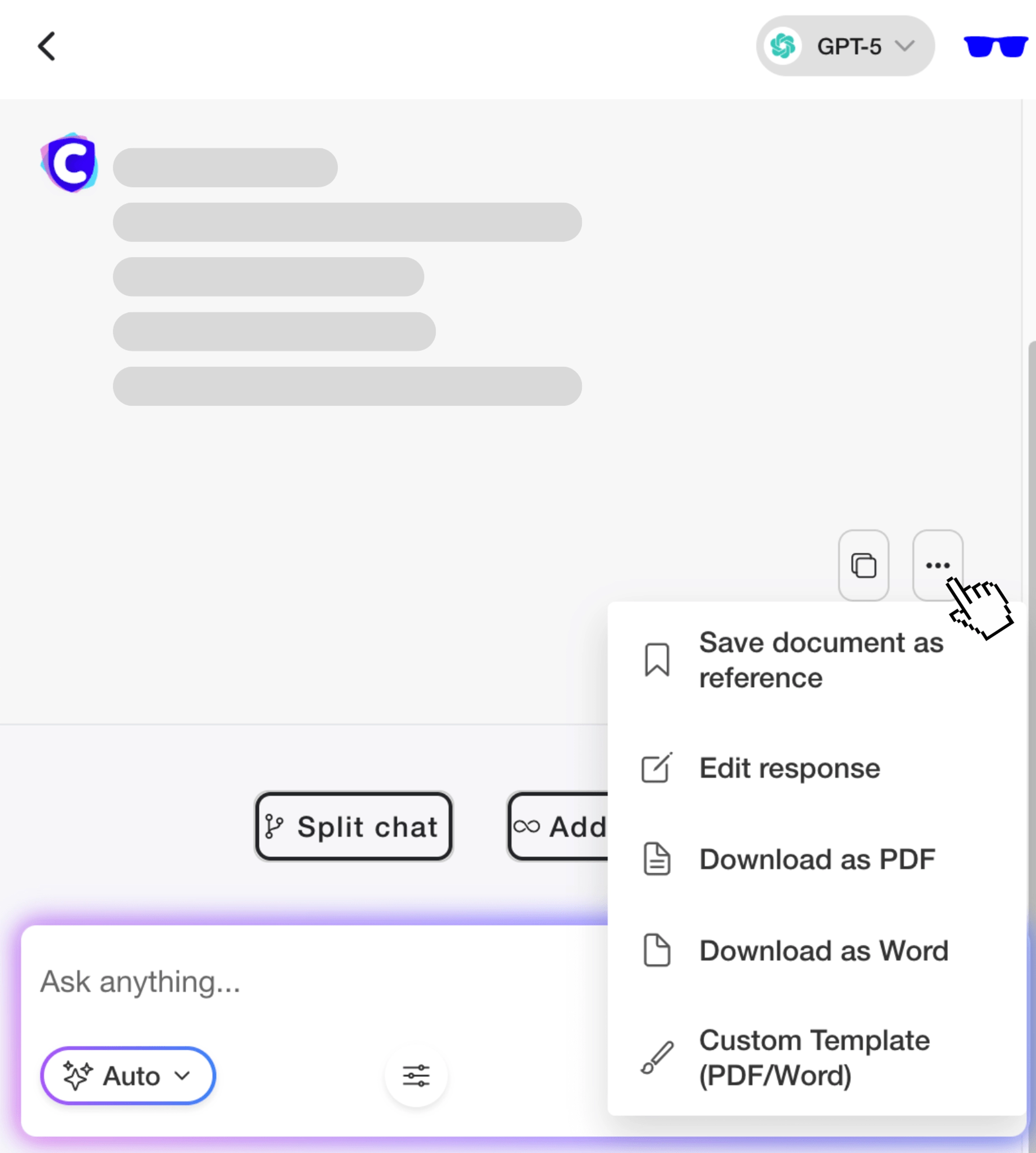
Click on the button with the three dots below the AI answer to manage the response. Create a reference document from it, edit it, or download it as PDF/Word. If you want to download the document with headers, page numbers or your own logo, choose the custom template.
AI is not infallible, and sometimes the tone isn't quite right. With CamoCopy, you can edit any answer from the AI. Simply click the edit button below the message.
Why this is useful:
- Error Correction: Remove hallucinations, inappropriate emojis, or correct names.
- Soft Training: If you correct the answer, the AI "learns" from it for the rest of that chat. It thinks it gave that perfect answer itself and adapts to your style.
- Storage Options (Local vs. Sync): After editing, you decide how it is saved. Choose "Local" to save the change only temporarily in the browser (maximum security), or "Sync" to save it permanently in your account.
Turn your chat into a finished product. Below every answer, you will find a download button.
This is particularly effective in combination with the "Edit" function: First perfect the text, then download. You can export the text as a PDF or Word file. The highlight: You can upload your own company logo, which is automatically placed professionally on the document. This turns an AI answer into a finished report or letter in seconds.
As mentioned below in "Common Mistakes", an endless chat history is counterproductive. CamoCopy offers Workspaces for this.
Organize your topics (e.g., "Marketing", "Private", "Invoices") in separate workspaces. The special feature: You can activate "Workspace Memories". This allows the AI to remember contexts and details across different chats, but only within that specific workspace.
Once you master the basics, these tools will help you further:
Branching Chats:
Imagine you've had a long discussion and now want to ask a "what if" question without losing the original history. With the "Branch" function, you create an exact copy of the chat at the current point. You can experiment in the new branch while the original remains intact.
Global Memory:
Do you want the AI to always know certain things about you (e.g., "Always answer briefly")? You can create a global memory from within a chat.
Important: You are in control. Click "Use memory" in the input to decide if the AI should have access to this global knowledge right now.
File Management & Encryption:
Upload PDFs, Word files, or images. Either temporarily into a chat or into your global storage in the dashboard to reuse them repeatedly. Use the syntax @filename in the chat to tell the AI exactly: "Please analyze @draftcontract.pdf".
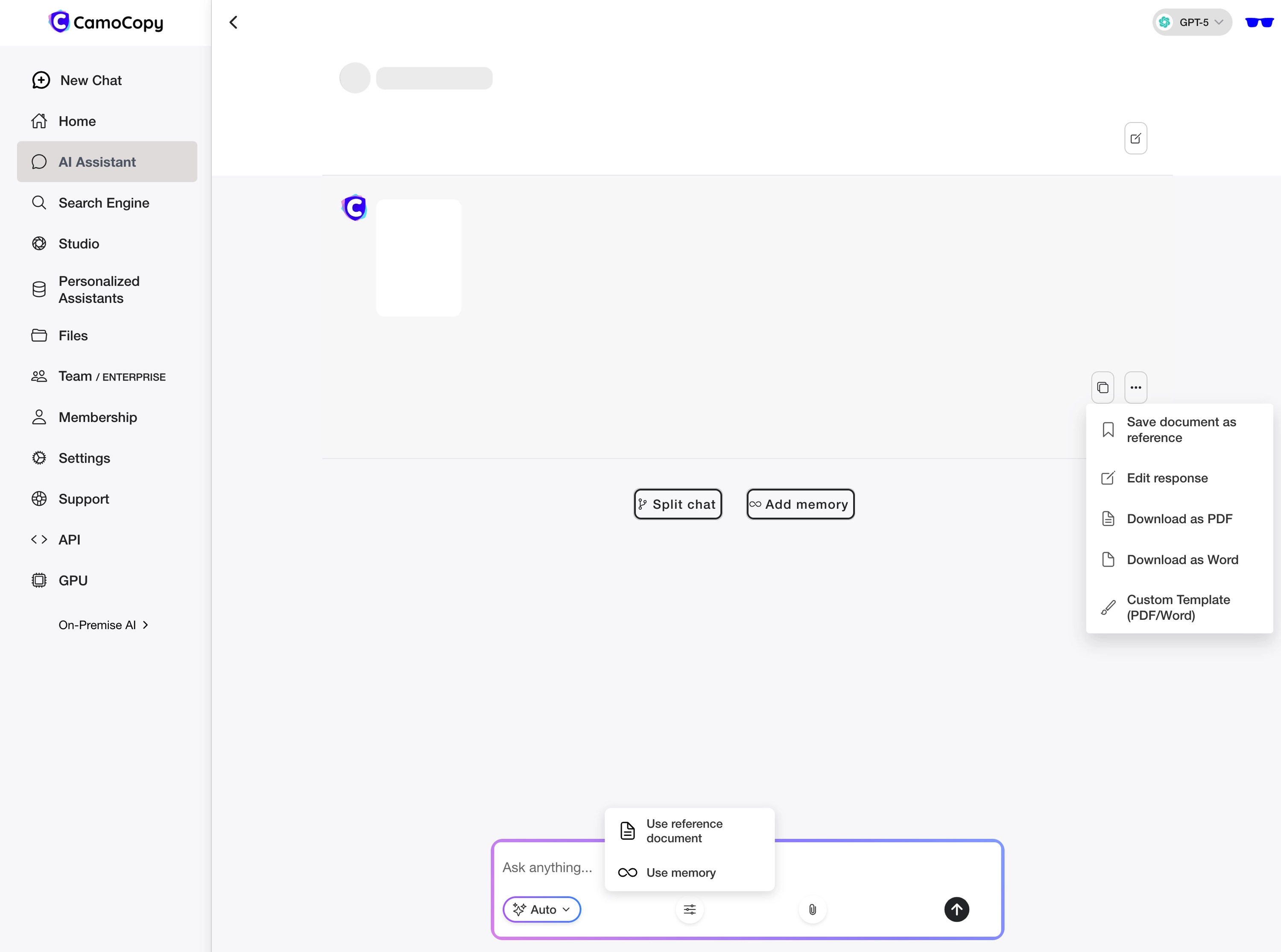
The interface allows for model switching, document uploads, and managing your secure workspace.
To get the most out of the AI, the way you interact with it is crucial. Here are the most common pitfalls and how to avoid them:
✖ Mistake: A Single, Endless Chat History
Why this is problematic: AIs have a limited "context window". In an eternal chat, the AI eventually forgets the beginning or gets confused by old, now irrelevant information.
✓ Better: Start a new chat for every new topic or project.
✖ Mistake: Missing Context ("Make this text better")
Why this is problematic: "Better" is subjective. Without context, the AI delivers generic averages. It doesn't know if the text is for a CEO, a child, or an expert.
✓ Better: Define target audience, tone, and the goal of the text (e.g., "Rewrite this text to sound convincing for IT specialists").
✖ Mistake: Giving Up Immediately After the First Attempt
Why this is problematic: The first answer is rarely perfect. Many users mistakenly think the AI "just can't do it" instead of following up.
✓ Better: Iterate. Tell the AI exactly what was wrong with the answer ("The tone is too formal, make it more casual"), and let it correct it.
✖ Mistake: Asking for the AI's "Opinion"
Why this is problematic: AIs have no feelings or opinions. You often get long, meaningless disclaimers ("As an AI language model...") that distract from the actual topic.
✓ Better: Instead, ask for "pros and cons" or "possible perspectives on the topic".
✖ Mistake: Overdoing Politeness
Why this is problematic: Excessive "please", "thank you", or long preambles consume unnecessary processing capacity (tokens) and can dilute the focus of the prompt.
✓ Better: Formulate directly, clearly, and instructively.
✖ Mistake: Blind Copy & Paste
Why this is problematic: AIs often use typical "AI words" (e.g., "crucial", "in the realm of", "conclusion") or American sentence structures. This seems unnatural. Additionally, factual errors (hallucinations) may be included.
✓ Better: Always fact-check the text, edit it humanly, and adapt it to your own style.
"In summary: CamoCopy is not just a chatbot, but a complete ecosystem for productive work with AI – secure, connected, and always with access to current knowledge."